How to Submit Projects
Projects are submitted through Brightspace, the same way you submit a set of Labs or Exercises.
Before you submit
- Make sure all four project parts are complete, and double check that your code addresses the Problem Statement of each part.
- Double check that each part adheres to the course Coding Standards.
- Double check that the Planning List is filled out for each part.
Submitting
- Delete the existing
unit01.zipfile if one is already there, then compress your wholeunit01folder into a newunit01.zip. - In Brightspace, open our course and click the current unit in the left navigation -- in this case Unit 1.
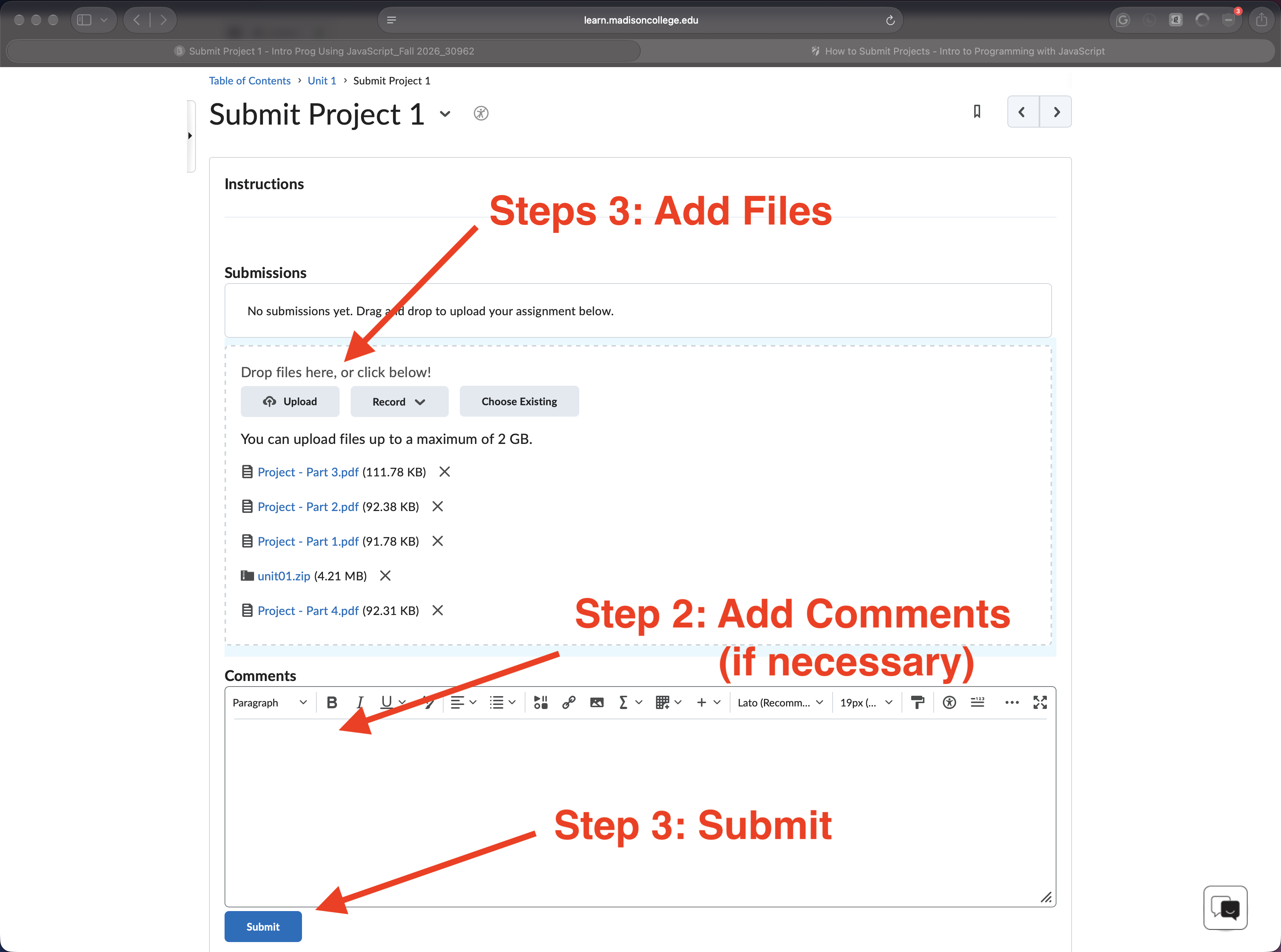
- Above the list of weeks, click Submit Project 1.
- Click Add a File and attach your
unit01.zip. - In the Comments box, answer the reflection questions.
- Click Submit -- not Save as Draft.
- Check for the confirmation message, and confirm the submission appears in the folder's submission history.
Resubmissions
Projects are graded met / not met. If a project comes back as not met, you may correct it and resubmit within 7 days of the day it was graded.
Hands on work
Labs
- Submitting a Project
- unit01/labs/lab-08-practiceSubmission.html